Documentation
Technical information
This tutorial is about training a language model with LSTM (Long Short Term Memory)/ RNN. More precisely, it is about "Next Word Prediction". For this process, e.g. a text, report, etc. is to be trained for the neural network, so that the next matching word is suggested for the search field after the first word has been entered in it.
The website was built with the following languages:
- Python (Jupyter Notebook)
- TensorFlow
- Voila and MyBinder to publish the website
The Recurrent Neural Network is a type of neural network in which the output of the previous step is fed as input to the current step . In traditional neural networks, all inputs and outputs are independent of each other, but in cases where it is necessary to predict the next word of a sentence, the previous words are required, and therefore there is a need to remember the previous words. Thus, RNN was born, which solved this problem using a hidden layer. The main and most important feature of RNN is Hidden state , which remembers some information about a sequence.
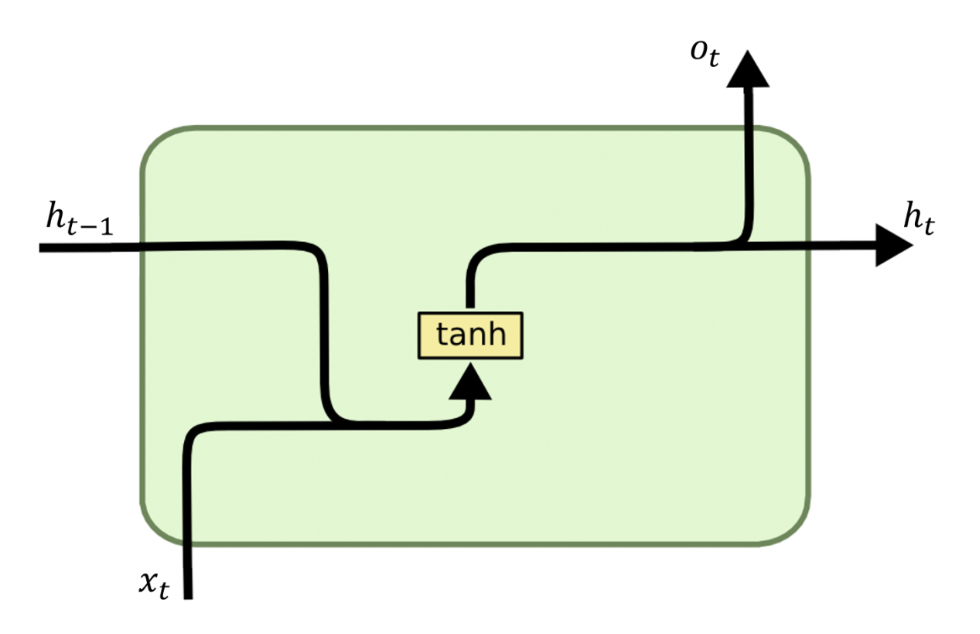
To summarize: An RNN remembers each piece of information over time. It is useful in time series prediction only because of the function of remembering previous inputs. This is called Long Short Term Memory.
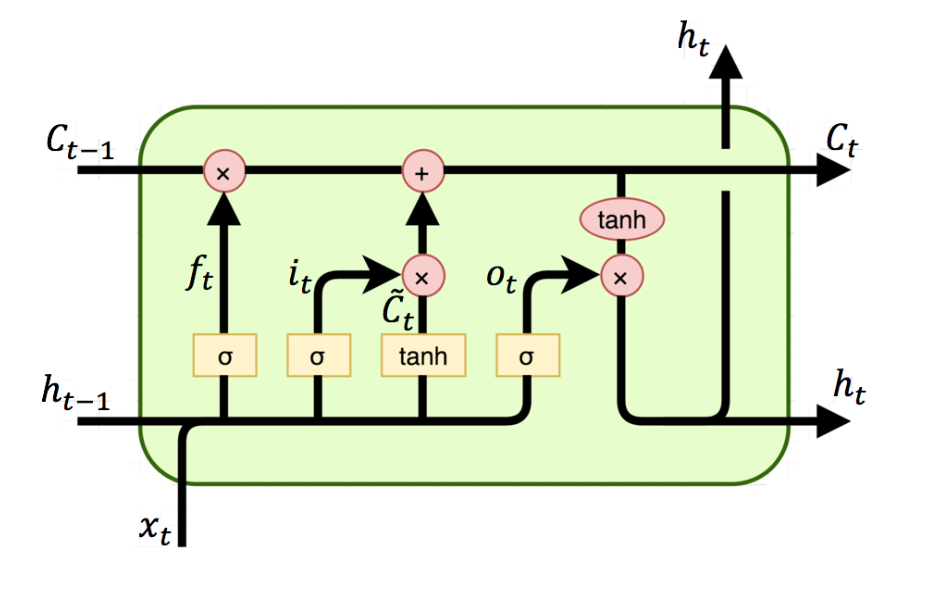
Logical information
To solve the task, I followed the Python code of Bharath-K3. The structure works as follows:
In order to use the neural network, it must first be trained. This is done in a separate file by uploading a dataset (e.g. emails or texts) into the training set and training it. After training, a .h5 file (trained model) and the corresponding token are automatically generated. For the further procedure now comes the file for Next Word Prediction. In this file the .h5 file and the corresponding token is called. The words from the data set are identified with certain tokens or tensors. As soon as a word is typed into the search line and related words are searched for, the neural network tries to guess the words. The words are still tensors in the process. For comprehension, the guessed words are sorted in order of prediction. So the first guessed word or tensor is the most "matching" next word. The code now converts the tensors back into text, so that it is naturally readable for the user.
The website is very simple and clean. The only interactions are "enter text", "start guessing" and "change value of to be guessed". In addition, when the user enters a word, he can also press the "Enter" key.
